How many courses can a Garmin Edge hold? We filled an Edge 1060 to find out
A Garmin Edge keeps a fixed number of courses: 100 on most models, 200 on the Edge 1060 we tested. When it's full, it accepts a new course without complaint and then drops it. Our test, what it means, and how to never hit the limit.
In this guide
You send tomorrow’s route to your Edge. The phone says it’s there. In the morning you open Navigation → Courses, and it isn’t. No error, no message, just not there.
The likely reason is that your Edge is full. A Garmin Edge keeps a fixed number of courses, however small they are, and the newest models don’t always tell you when you’ve reached it. We wanted to know the real number, so we filled one.
How many courses a Garmin Edge keeps
- Most Garmin Edges and watches: 100 courses. Some keep fewer: the Edge 130 only 15, and the 130 Plus 30 (Ride with GPS’s list).
- The Edge 1060: 200 courses. That’s what we measured, below. Other recent models may also keep 200; we’ve only tested the 1060.
The limit is a number of courses, not storage space. A 3 km loop counts as one course, and so does a 600 km brevet. A card full of maps doesn’t change it.
The test: 210 tiny routes into an Edge 1060
We made it as easy for the Edge as we could.
- We emptied the Edge. No courses at all.
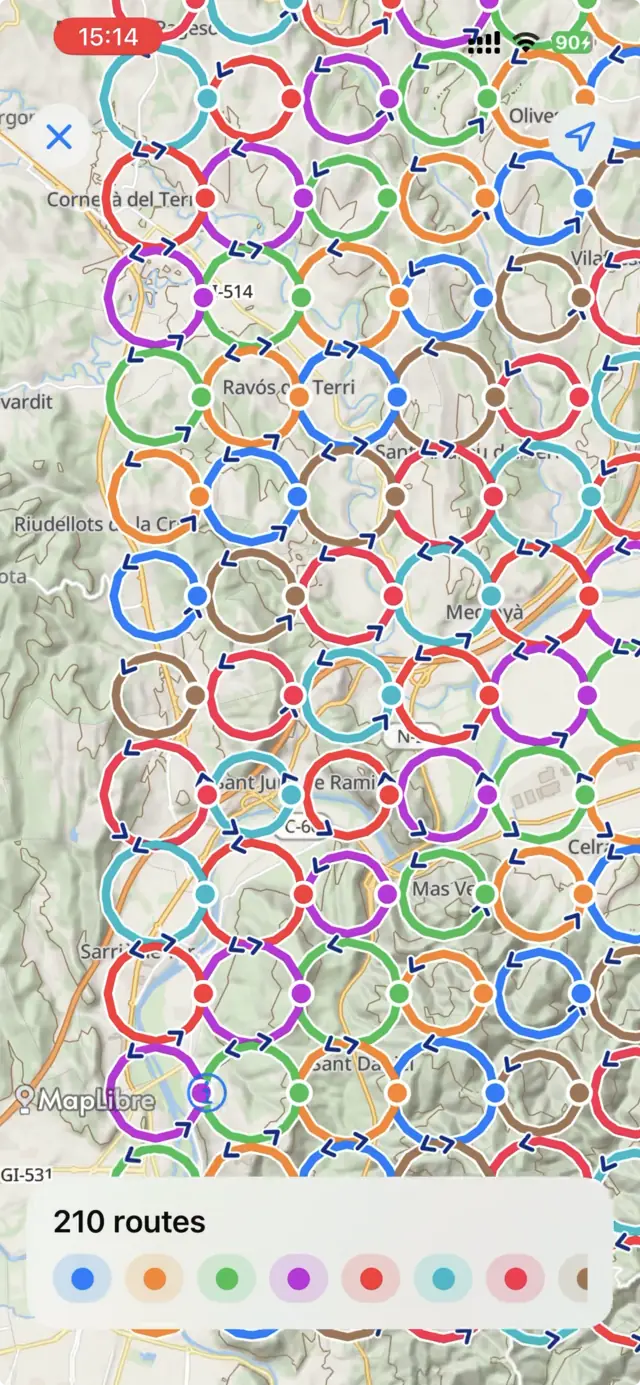
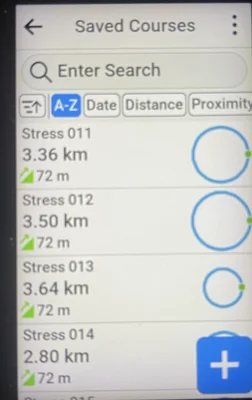
- We made 210 test routes, “Stress 001” to “Stress 210”: 3 km loops of 41 points each, under 1 KB each as a Garmin course. About as small as a course gets.
- We sent all 210 from an iPhone over Bluetooth, in one go. It took 2 minutes 21 seconds, and the Edge confirmed every single course.
- We opened Courses on the Edge. It said “Opening 200 courses” and made us wait while it loaded the list. Copying the Edge’s course folder to a computer showed exactly 200 files. Ten were missing: the first ten we sent, Stress 001 to 010. Why those ten, we don’t know.
- We sent six more to the full Edge. The Edge confirmed each one. None appeared, and nothing else was removed to make room. No message on the Edge, none on the phone.
- We deleted one course on the Edge and sent one again. This time it arrived and showed in the list.
So an Edge 1060 keeps 200 courses. Once it’s full, a new course is accepted and then quietly dropped. Whatever app you send from (Garmin Connect, your planner’s sync, a cable or Ridekit), the result is the same if the Edge is full: the course isn’t there, and nothing tells you.
What this means on the road
- A full Edge fails silently. If a course you sent doesn’t show under Navigation → Courses, count what’s there before you suspect anything else.
- Long lists are slow. Even 200 tiny courses made the Edge stop to load them every time we opened the list. Real routes are bigger, and a long list of them is slower to open and harder to search with gloves on.
- Syncs fill it up behind your back. Planner syncs add routes by themselves: Komoot sends your recent planned tours, Strava your starred routes, Ride with GPS your pinned ones. A season of planning can fill an Edge without you sending anything on purpose. See how to get a route onto your Garmin Edge.
Never hit the limit: keep the library on your phone
The fix is to stop using the Edge as your route library. Keep every route on the phone, where there’s no limit and a big screen, and put on the Edge only what you’re riding next.
That’s what Ridekit is for. It keeps all your routes in one library on your iPhone, from Komoot, Ride with GPS, Strava, clubs, events and friends, and sends a course to your Edge over Bluetooth, with no internet, whenever you need it. Our 210 test routes sat in one collection and opened on one map without any trouble, and so does a real collection of brevets, tours and Sunday loops.
- Keep everything in Ridekit. Import the files or connect your Ride with GPS or Strava account. Group trips and areas into collections, and use search to find a route by name, length, gravel or a stop along the way. See keep every route on your phone.
- Send only what’s next. Today’s ride, or this week’s stages. Open the route and tap Send to bike computer under Tools. See send a route to your Garmin Edge with no internet.
- Clear the Edge after the ride or the trip. On the Edge, open Navigation → Courses and delete what you’ve ridden. Nothing is lost: every route is still in Ridekit, ready to send again, even with no signal.
Ridekit can’t see how many courses are on the Edge, and a full Edge confirms a course it then drops. So keep the Edge short, and you’ll never meet the limit.
Good to know
- Turning off planner syncs stops them filling the Edge: for Strava, turn off Courses in Garmin Connect (More → Settings → Connected Apps → Strava); for Komoot, turn off Courses in Komoot’s Profile → Settings → Connections. Then send only the routes you choose.
- Clearing many courses at once: deleting on the Edge goes one by one. With the Edge plugged into a computer, its courses are files in the Garmin/Courses folder. On a Mac, newer Edges need an app that can open media devices (MTP) to see them. Restart the Edge afterwards.
- More on keeping the Edge tidy: a hundred routes on your bike computer, and you still can’t find the one you need.
- Ridekit isn’t affiliated with Garmin. We ran this test ourselves, on our own Edge 1060.